
Check SIM Information Online – PTA SIM Verification in Pakistan
Checking your SIM data online is a good idea to protect your mobile identity and personal data. Any SIM card used in Pakistan must be registered against a valid CNIC through biometric verification. Check how many SIMs are linked to your CNIC and find any unregistered SIMs using PTA services. This guide explains how to check SIM information, understand PTA rules, and keep your mobile connection secure.
Check Now: Sim Owner Details
What Is SIM Information?
SIM information refers to the official registration details associated with a mobile SIM card. It includes the registered mobile network, SIM registration status, and the number of SIMs linked to your CNIC. These records are maintained by your mobile network operator in accordance with PTA regulations.
Checking the information on your SIM helps you confirm that the SIM is registered in your name and to identify any unauthorized SIMs associated with your CNIC. Verifying the information on your SIM regularly improves your security, protects your identity, and helps ensure that you are in compliance with Pakistan’s telecom laws.
How SIM Registration Works in Pakistan
SIM registration in Pakistan is done through Pakistan Telecommunication Authority (PTA). Every SIM card must be verified before activation.
- Identification: your fingerprints are checked prior to issuing a new SIM.
- CNIC Linkage: Every SIM on which a call is made is linked to a CNIC.
- PTA Database: Registration information is stored in the official PTA database.
- Mobile operators: Jazz, Zong, Ufone, Telenor, ONIC and SCO follow the same process of registration as per the PTA.
Official Ways to Check SIM Information
You can check SIM information in Pakistan through official and secure methods provided by PTA and mobile network operators. These methods help you verify the number of SIMs registered against your CNIC and identify any unauthorized registrations.
PTA Online Portal
The official PTA SIM Information Portal is the safest way to check SIM registration details online.
- Visit the official PTA portal.
- Enter your CNIC number.
- Complete the captcha verification.
- Click Submit to view registered SIM details.
SMS 668
If internet access is unavailable, you can check SIM information by SMS.
- Open the Messages app.
- Enter your CNIC number without dashes.
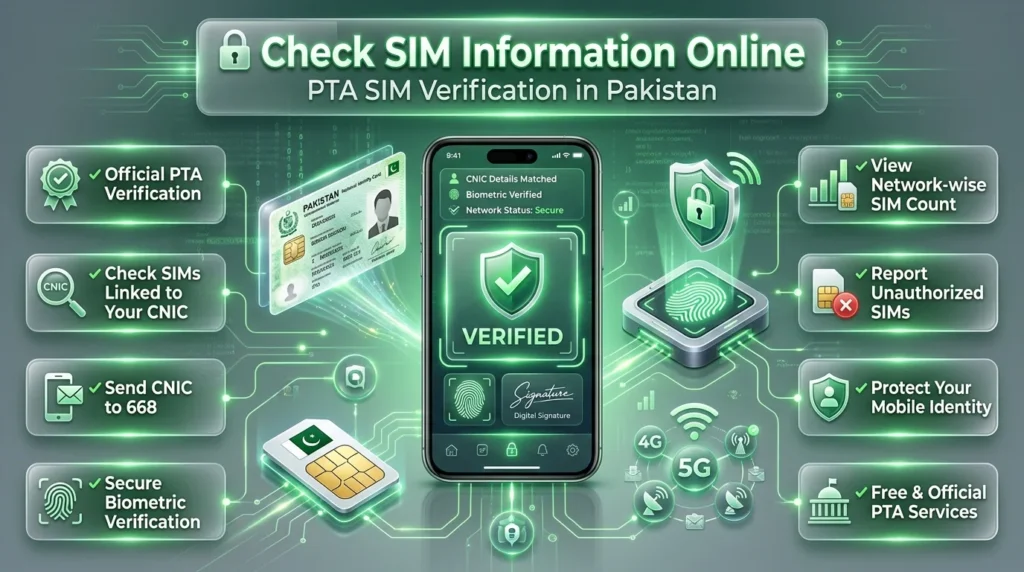
- Send it to 668.
- Receve a reply indicating the number of SIMs registered on each network.
Customer Service
All of the top mobile operators provide support for SIM verification via their official channels.
Contact Jazz customer support or visit a Jazz franchise.
- Contact Zong customer care or visit a service center.
- Visit or contact Ufone support.
- Contact Telenor support or visit one of our official franchises.
Mobile Apps (If Officially Available)
Some mobile operators may offer account management and SIM-related services through their official mobile applications. Always use only verified apps published by the network operator and avoid third-party SIM checker applications that claim to provide private SIM owner information.
Step-by-Step Guide to Checking SIM Information
Follow these simple steps to verify your SIM information using official PTA services:
1: Choose an Official Verification Method
- Visit the PTA SIM Information Portal, or
- Send your CNIC number to 668 via SMS.
2: Enter Your CNIC
- Type your 13-digit CNIC number correctly.
- Do not use spaces or incorrect digits.
3: Complete the Verification
- Complete the captcha (for the online portal), or
- Wait for the SMS response if using the 668 service.
4: View Your SIM Details
- Check the total number of SIMs registered against your CNIC.
- Review the network-wise SIM count.
5: Report Any Unknown SIMs
- If you find a SIM you don’t recognize, contact your mobile network operator immediately or visit the nearest customer service center for assistance.
Mobile Network Verification Guides
Jazz SIM Verification
- Visit the nearest Jazz franchise or service center.
- Contact Jazz customer support for SIM verification.
- Carry your original CNIC for identity verification.
Zong SIM Verification
- Visit an authorized Zong Customer Service Center.
- Contact the official Zong helpline for assistance.
- Verify your registered SIM details using your CNIC.
Ufone SIM Verification
- Visit the nearest Ufone service center.
- Contact Ufone customer support for verification.
- Keep your original CNIC for confirmation.
Telenor SIM Verification
- Visit a Telenor franchise or customer service center.
- Request SIM registration verification.
- Verify your identity using your CNIC.
ONIC SIM Verification
- Use ONIC’s official customer support channels.
- Follow the verification process as instructed.
- Confirm your SIM registration details securely.
SCO SIM Verification
- Visit the nearest SCO customer service office.
- Contact SCO support for SIM-related inquiries.
- Verify your registered SIM using your CNIC.
Common Verification Problems
PTA Portal Not Opening
- Check your internet connection.
- Refresh the page or try again later.
- Clear your browser cache if needed.
SMS Verification Failed
- Make sure your CNIC number is entered correctly.
- Check if you have sufficient SMS balance.
- Resend the message to 668.
OTP Not Received
Wait a few minutes and try again. Verify that your mobile number is registered, or check that your phone is connected to the network.
Unknown SIM Found
Verify the SIM details. Contact your mobile operator to request that unauthorized SIMs be removed.
Verification Errors
Recheck your CNIC number. Verify that you’re using the official verification service. Contact customer support if it continues to happen.
Why You Should Regularly Check SIM Information
Fraud Prevention
- Detect unauthorized SIMs linked to your CNIC.
- Risque of identity misuse and mobile fraud reduced.
Identity Protection
- Assure that all your SIMs are registered with you.
- Please keep your information private.
Better Security
- Monitor your SIM registration status regularly.
- Report suspicious or unknown SIMs immediately.
Legal Compliance
- Stay compliant with PTA regulations.
- Use only officially registered and verified SIM cards.
PTA Rules Every Mobile User Should Know
Maximum SIM Limits
- PTA allows a limited number of SIMs to be registered against one CNIC.
- Check your registered SIMs regularly to stay within the allowed limit.
Biometric Verification
- Every new SIM must be activated through biometric verification.
- Your fingerprints and valid CNIC are required for SIM registration.
Legal Responsibilities
- Be sure to use SIM cards in your name.
- Report any unknown or unauthorized SIMs to your mobile operator immediately.
- Never share your CNIC or biometric information with anyone.
SIM Verification Comparison Table
| Verification Method | Pros | Cons | Time | Cost | Accuracy |
| PTA Online Portal | Free, official, easy to use, accessible from anywhere with internet | Requires an internet connection | 1–2 minutes | Free | Very High |
| SMS (Send CNIC to 668) | Quick, simple, works without internet | Standard SMS charges apply | A few seconds | Standard SMS charges | Very High |
| Customer Support / Service Center | Official assistance, resolves verification issues, personalized support | May require a visit or waiting time | 5–15 minutes | Usually Free | Very High |
Common Mistakes to Avoid
Using Fake Websites
- Avoid unofficial sites that claim to provide information about SIM owners.
- They may steal your personal information or display inaccurate data.
Sharing Your CNIC
- Never share your CNIC with unknown people or untrusted websites.
- Only use your CNIC on official PTA or mobile networks.
Using Third-Party Databases
- Do not rely on unofficial apps or databases for SIM verification.
- Always use authorized PTA and network operator services.
Ignoring Unauthorized SIMs
- Regularly check the SIMs registered on your CNIC.
- Report any unknown or suspicious SIM immediately to your mobile operator.
Frequently Asked Questions (FAQs)
How do I check my SIM online?
Check your SIM information via the official PTA SIM Information Portal, or using the official service of your mobile network.
How do I check how many SIMs are registered on my CNIC?
Visit the official PTA SIM Information Portal or send your 13-digit CNIC number to 668, and you’ll get the total number of SIMs registered against your CNIC.
Is the PTA SIM Information Portal free to use?
Yes. The PTA online portal is completely free for checking the number of SIMs linked to your CNIC.
Does checking SIM information through SMS cost money?
Yes. Standard SMS charges apply when you send your CNIC number to 668.
Can I check SIM information without the internet?
Yes. You can send your CNIC number to 668 via SMS to verify your registered SIMs.