
PTA SIM Blocked in Pakistan? Reasons, Check & Unblock Guide 2026
If your SIM card is not working for calls, SMS, or mobile data, one of the reasons might be PTA-related blocks. But there are several other factors that might disturb your cellular connection and prevent proper usage of the SIM card. In case of any issues with your mobile operator, it is essential to identify your problem and solve it as soon as possible.
The article below will provide you with information on common issues leading to blocking or restriction of your cell phone SIM card, explain how to determine the cause of the malfunction, and tell you how to resolve the situation.
Why Can a SIM Be Blocked in Pakistan?
PTA regulates Pakistan’s telecom sector, so it can direct mobile operators to do as it sees fit. In turn, operators can suspend or deactivate SIMs according to regulations and procedures. This suggests that before attempting to restore the number, the user should check if it relates to the SIM, mobile phone, registration, or network service.
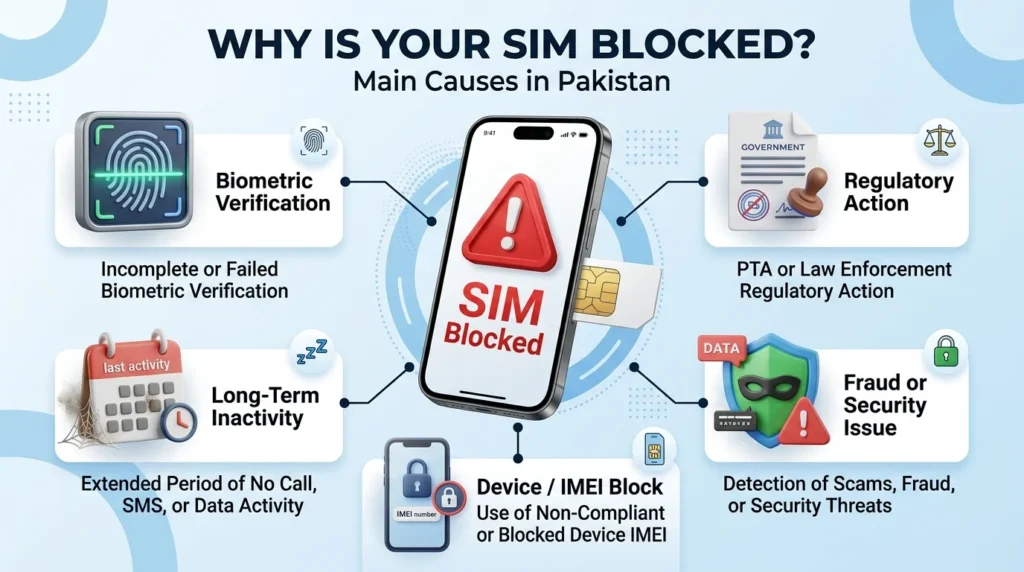
Common Reasons Behind PTA-Related SIM Blocking
1. Biometric Verification Problems
SIM registration depends on identity verification. If a SIM does not meet the required biometric verification requirements, the subscriber may receive a notification asking for verification or re-verification. If you receive such a message, visit your network operator’s service center with your original CNIC and complete the required biometric process.
2. Long-Term SIM Inactivity
A SIM inactive for a prolonged period can be turned off according to the relevant inactivity rules. If you did not make any outgoing calls, send any short message service (SMS), or use it for data for a long time, inactivity might explain why the service has ceased. Contact your network operator as soon as you can to reactivate an inactive number since the process can take the amount of time reserved by the relevant regulations.
3. Large-Scale Regulatory Enforcement
PTA may conduct broader compliance actions when SIM registration or verification problems are identified. Such actions can affect a large number of connections at once. If your service stops during a widely reported regulatory action, check your SIM registration and verification status before assuming that PTA has permanently cancelled your SIM.
4. Device or IMEI Blocking
Sometimes the problem is not the SIM at all. PTA’s DIRBS system can block a mobile device based on its IMEI status. When this happens, a working SIM may appear to have no network service because the phone itself has been restricted. To check this possibility, dial: *#06#
This displays your device’s IMEI. You can then check the IMEI status through the official DIRBS system. If the SIM works in another compatible device, the problem may be related to the original phone rather than the SIM.
5. Legal or Law-Enforcement Directions
In specific circumstances, a SIM or connection can become subject to action associated with a legal or law-enforcement matter. If your operator confirms that the restriction resulted from a legal directive, ordinary SIM replacement or biometric verification may not resolve the issue. In such circumstances, seek appropriate legal guidance.
6. Temporary Security-Related Suspensions
PTA can also direct temporary telecom service restrictions in particular areas or during sensitive security situations. These restrictions generally affect a geographical area rather than a single subscriber. If multiple users in your location lose service at the same time and the situation is being publicly reported, the issue may be a temporary service suspension. In many cases, service returns after the restriction ends.
7. Fraud or Security-Related SIM Issues
A legitimate number can also become involved in an operator’s fraud investigation or security process. For example, unusual activity involving SIM replacement, unauthorized porting, or other suspicious activity may lead an operator to restrict a connection while investigating the situation. If you suspect this is the reason, contact your network operator and ask specifically for assistance from its fraud or security department.
How to Find Out Why Your SIM Stopped Working
Before visiting a service center, perform a few basic checks.
Step 1: Test the Number
Call your number from another phone and note what happens.
Different messages can indicate different situations:
- Number does not exist: The number may have been fully deactivated or deregistered.
- Switched off or unavailable: This can have several causes, including device or SIM problems.
- Temporarily out of service: The connection may have an active restriction.
These messages are only indicators, so do not rely on them alone to identify the exact reason.
Step 2: Check Your CNIC Registration
You can check SIMs associated with your CNIC through the available official SIM information channels. This helps you determine whether the affected number remains linked to your identity record. If the SIM appears in your registration information, the number may still be registered even though the service is restricted. If the SIM does not appear, the connection may have been deregistered or may need further investigation.
Step 3: Check Your Phone’s IMEI
A SIM problem and an IMEI problem are different. Dial: *#06#
Then check the IMEI status through the official DIRBS service. If the device has an IMEI restriction, changing or re-verifying the SIM may not solve the problem.
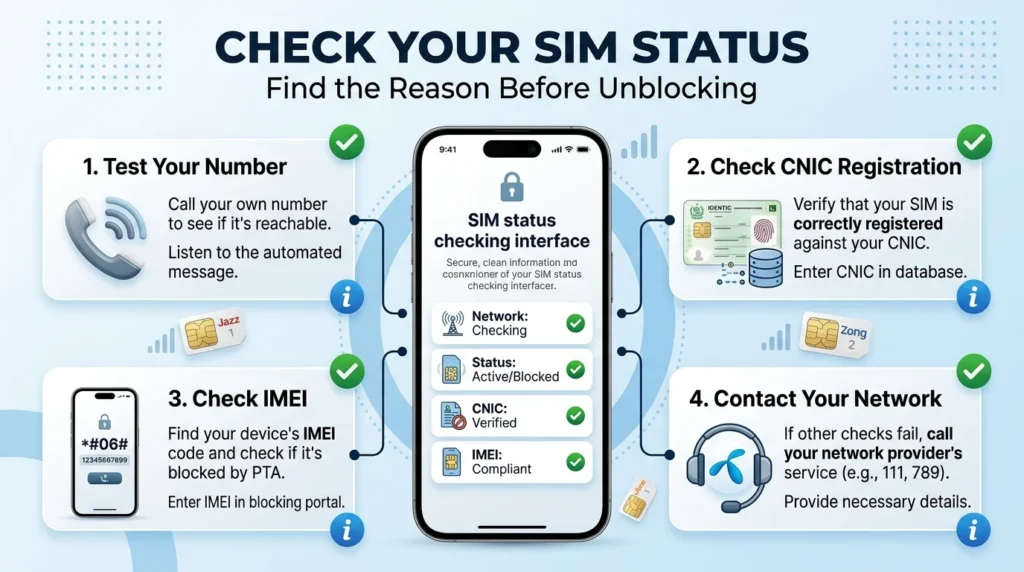
Step 4: Contact Your Mobile Operator
The operator can check the status of your connection in its internal system. When contacting customer support, clearly ask:
“Please tell me why my SIM has stopped working and whether the restriction is related to PTA, inactivity, biometric verification, fraud, or another issue.”
Ask for the exact reason and the steps required to restore the service.
How to Unblock a PTA-Related SIM
The correct solution depends on the reason behind the restriction.
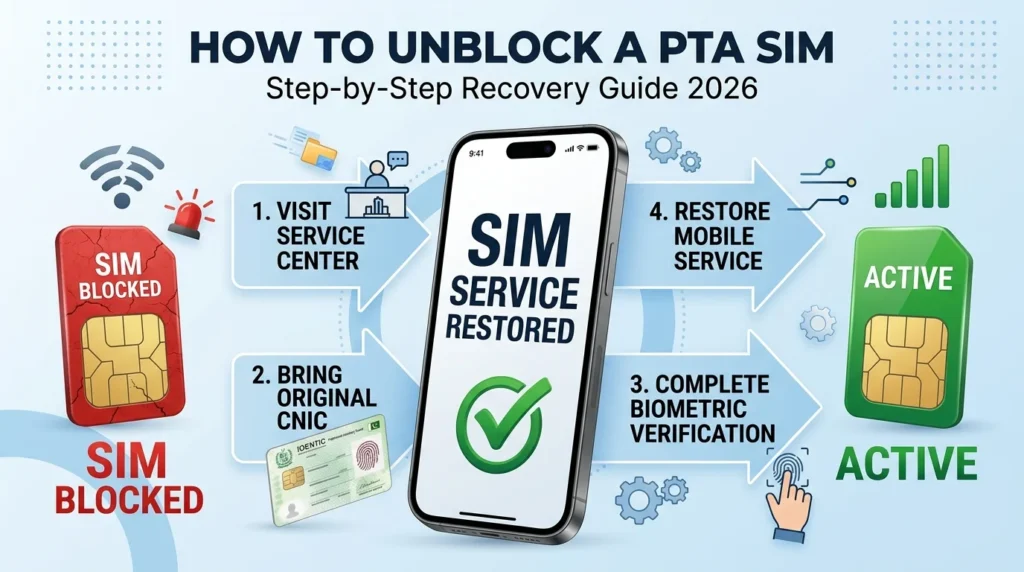
If Biometric Verification Is Required
- Visit your mobile operator’s service center.
- Take your original CNIC.
- Request biometric re-verification for the affected number.
- Complete the required fingerprint verification.
- Wait for the operator to restore the service.
The restoration time can vary depending on the operator and the reason for the block.
If the SIM Was Deactivated Because of Inactivity
If the number is still within the applicable recovery period:
- Visit the operator’s service center.
- Provide your original CNIC.
- Ask whether the number can be recovered.
- Complete biometric verification if required.
- Pay any applicable charges.
- Follow the operator’s instructions for reactivation.
Do this as soon as possible because a deactivated number may eventually become available for reassignment.
If the SIM Was Affected by a Compliance Action
For compliance-related restrictions, the operator may require you to complete verification or update registration information. Visit the relevant service center and ask the representative to check the exact restriction on your number.
If You Believe the Block Is Incorrect
Your SIM is correctly registered, but you believe the restriction is incorrect. Contact your mobile operator first. When the operator cannot resolve the problem, file a complaint with PTA and share the necessary details, along with the operator’s reference number if available.
How to Avoid Future SIM Blocking Problems
You can reduce the chances of unexpected service interruption by keeping your SIM information up to date.
Keep Your Biometric Information Updated
Complete any biometric re-verification requested by your operator instead of ignoring the notification.
Respond to Verification Messages
If you receive an SMS regarding the issue of “registration” or “verification” through any means, you must act on it before the deadline.
Use Infrequently Used SIMs
Don’t leave your important backup SIM cards unused for long periods. Use them periodically to avoid issues caused by prolonged inactivity.
Keep Your CNIC Information Current
Make sure your identity information is valid and up to date when dealing with SIM registration.
Check Your Registered SIMs Regularly
Regularly reviewing the SIMs associated with your CNIC can help you identify numbers you do not recognize and notice registration changes.
What If the Operator Does Not Unblock Your SIM?
If the operator cannot resolve the issue, follow these steps:
- Ask for the exact reason
Request a clear explanation of why the number remains blocked.
- Keep your complaint reference
When you contact customer support, keep the complaint or reference number for future follow-up.
- Escalate the issue
If your operator fails to resolve a valid complaint, submit the issue through PTA’s official complaint process.
- Seek legal assistance when necessary
If the restriction involves a legal or law-enforcement issue and you believe someone applied it incorrectly, consider getting professional legal advice.
Does a Blocked SIM Affect Mobile Wallets?
A blocked sim can cause issues with services that require SMS or OTP. If your mobile wallet is connected to the number on the blocked sim, you may not be able to receive any verification messages whilst the sim is inactive. If you need to access your wallet, contact your wallet provider and ask what account recovery / verification options are available to you.
Does a Blocked SIM Mean You Lose Your Number?
Not necessarily. A temporary SIM block is different from permanent deregistration. A number may remain associated with the subscriber while the underlying issue is being resolved. However, if a number remains inactive or unresolved for an extended period, it may eventually enter a reassignment process according to the applicable rules.
Final Thoughts
A SIM that stops working suddenly is not always a permanent PTA block because biometric, inactive status, regulatory power, device IMEI restrictions, fraud checks or security issues can all be possible. It is best to ascertain the exact cause first. Check your PTA registration, check the IMEI of a device that may require it, contact your network provider and undergo the verification or recovery process. If the operator cannot resolve a legitimate problem, file a complaint with the relevant PTA channel.
FAQs
How can I know whether PTA blocked my SIM?
Check your SIM registration, try a new number from another phone, check device IMEI, contact your mobile operator. Your operator can tell you what limitations are placed on your connection.
Can biometric verification restore a blocked SIM?
If a restriction is imposed that requires biometric verification, this can be done with the operator to remove the block.
What should I do if my SIM stopped working because of inactivity?
You must contact your operator as soon as possible and find out whether your number is eligible for restoration. The length of inactivity determines whether it is possible to restore the number.
Can an IMEI block be mistaken for a SIM block?
Yes, because an IMEI restriction does not affect the SIM card. You can try using a different device to see what restrictions you are experiencing.
Can I complain to the PTA about an incorrect SIM block?
Yes, if your operator fails to respond to a case of an incorrect block, you can contact the PTA and send them details of your situation.
Will my number immediately go to someone else after a block?
No, because a temporary block prevents any service, a number will not be immediately assigned to another customer. Number deactivation and reassignment are entirely separate procedures.